Run Claude Code with any LLM
One command, your provider, zero changes to your Claude Code configuration. The provider's settings live only inside that session. Several Claude accounts, personal and Team, work side by side the same way.
$ wrapper-code deepseek
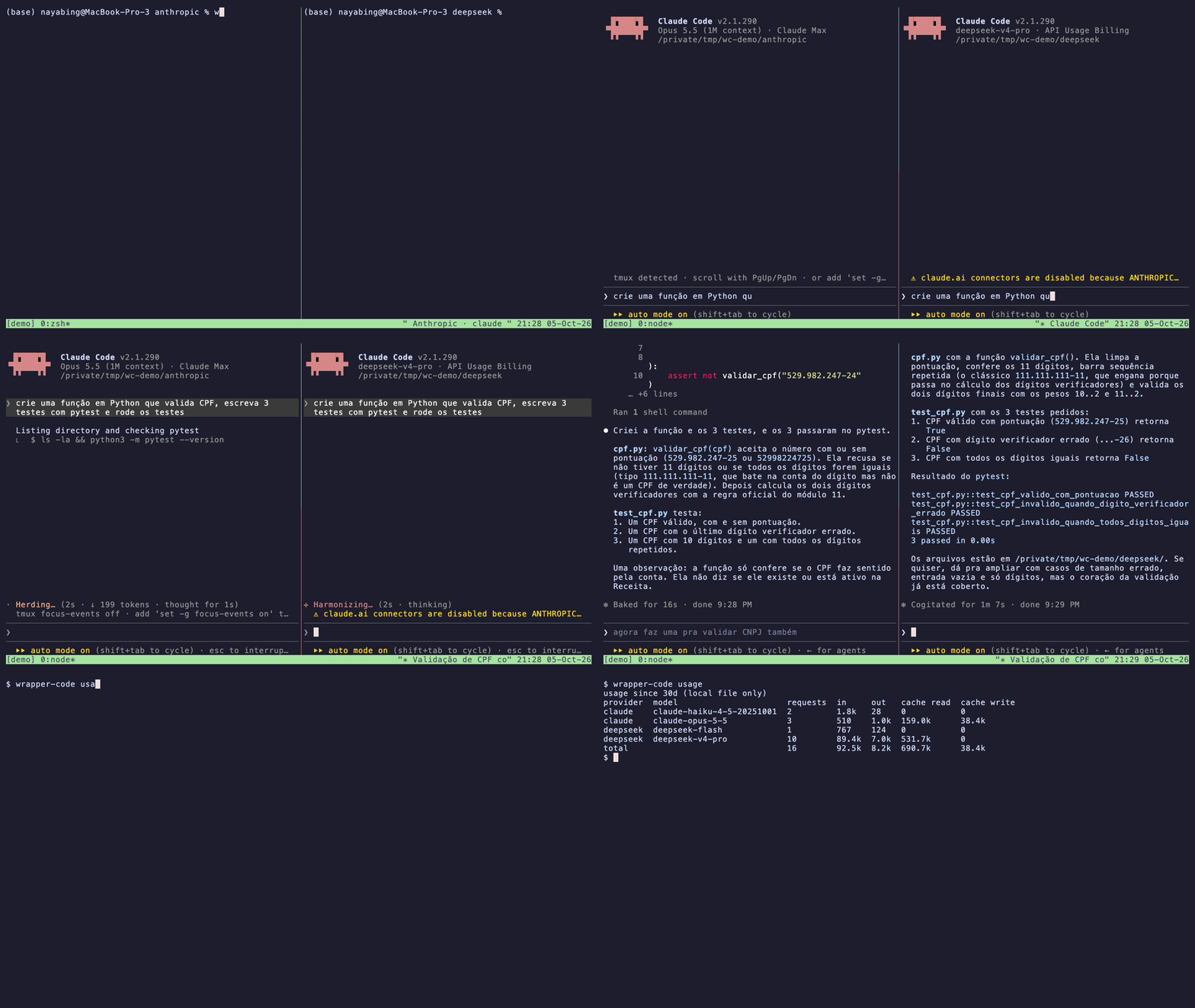
The same prompt in two terminals: wrapper-code claude on the left, wrapper-code deepseek on the right. When both finish, wrapper-code usage shows the requests and tokens of each one, by model.
Isolated
Only environment variables change, and only for that process. Plain claude keeps using Anthropic, and nothing is written under ~/.claude.
Side by side
Run several Claude Code sessions at the same time, each with its own LLM: wrapper-code deepseek in one terminal, wrapper-code qwencloud in another, plain claude in a third.
Claude accounts
Several Claude logins at once, a personal plan and a Team on the same e-mail included. wrapper-code claude --account work opens one, --temp logs in for a single session. Plain claude keeps its own.
Plan or pay per token
Use a subscription you already pay for, such as Kimi Code, the Qwen Token Plan or the GLM Coding Plan, or pay per token. wrapper-code list shows how each provider bills.
Setup in the browser
The first launch opens a local page: paste the key, pick a model profile, and the key is tested before anything is saved.
Token usage
Each session records its requests and tokens locally. wrapper-code usage adds them up by provider, model and day, wrapper-code usage clear deletes them, and wrapper-code claude counts your Anthropic usage too. Nothing leaves your machine.
Providers
| Command | Provider | Profiles | |
|---|---|---|---|
wrapper-code claude |
Claude Code Your own Claude Code login |
|
docs |
wrapper-code deepseek |
DeepSeek API key |
|
docs |
wrapper-code kimi-code |
Kimi Code Kimi Code API key |
|
docs |
wrapper-code kimi |
Kimi (Moonshot API) Moonshot API key |
|
docs |
wrapper-code ollama |
Ollama No key |
|
docs |
wrapper-code openrouter |
OpenRouter OpenRouter API key |
|
docs |
wrapper-code qwencloud-token |
Qwen Cloud Token Plan Token Plan API key |
|
docs |
wrapper-code qwencloud |
Qwen Cloud Qwen Cloud API key |
|
docs |
wrapper-code zai-coding |
Z.ai GLM Coding Plan Z.ai API key |
|
docs |
wrapper-code vs claude-code-router
claude-code-router (CCR) is a local gateway that routes, rewrites and retries every request, for Claude Code and other agents. wrapper-code only sets up the environment of one session and gets out of the way: nothing between Claude Code and the provider, nothing running when you are not working, plain claude untouched. If you need routing, fallbacks or other agents, use CCR.
Read the full comparison
claude-code-router (CCR) is the best-known way to run Claude Code on other models. It is a local gateway: a background service on 127.0.0.1:3456 receives every request from Claude Code (and from Codex, Kimi CLI, OpenCode and other agents), decides per request which provider and model to call, and can rewrite, retry, fall back to another model or key, translate to OpenAI- and Gemini-style APIs, and add vision, web search or MCP tools to a model that lacks them. It has a management UI, request logs with cost estimates, a desktop app and Docker images. If you need any of that, use CCR.
wrapper-code wants to solve a smaller problem: start one Claude Code session on one other provider, with nothing changed for your normal Claude Code and nothing extra running. It sets the provider's ANTHROPIC_BASE_URL, key and model variables in the environment of one claude process and gets out of the way. That is the whole design, and it is where its advantages come from:
- Nothing between Claude Code and the model. Requests go straight to the provider's endpoint. There is no local process to parse, rewrite and re-stream every request and response, and none that can be down. CCR's documentation lists its running service as a prerequisite for a Claude Code launched from it.
- Your prompts stay between Claude Code and the provider. wrapper-code never sees them; the only thing it receives is Claude Code's own token counts, over a loopback port with a random per-session token. CCR's gateway sees every request, and its request logs store request and response bodies (configurable: all, errors only or none; kept for the current day).
- Nothing runs when you are not working. No daemon, no desktop app, no database, no port left open. When
claudeexits, wrapper-code prints the usage block and exits too. - Plain
claudecannot be hijacked. Nothing is written under~/.claude, and there is no "system default" mode, so no setting could make your normal Claude Code talk to another backend. CCR has such a scope; its own guide recommends starting with "only opened from CCR" for the same reason. - Side by side. Each session carries its own environment, so
wrapper-code deepseek,wrapper-code ollamaand plainclaudecan run at the same time in three terminals. - The provider's integration, unchanged. Each provider definition follows the provider's published Claude Code setup (linked in the table above), and what reaches Claude Code is what the provider's endpoint sends: streaming, tool calls, caching and thinking as the provider implements them, with no translation layer in between.
- Small and readable. One npm package with no runtime dependencies (27 files, about 100 kB, Node.js 18+). The whole configuration is one environment file per provider that you can
cat; export the same variables by hand and you get the same session, with or without wrapper-code.
What wrapper-code does not do, by design: per-request routing, fallbacks, retries, key rotation, several providers in one session, protocol translation (the provider must speak the Anthropic Messages API), other agents than Claude Code. This reflects CCR 3.1 and its documentation (September 2026); check its repository for the current state.
Both can be installed at once. If a CCR profile is set as "system default", check that it did not add ANTHROPIC_BASE_URL to the env block of ~/.claude/settings.json: settings there win over the variables wrapper-code sets.
How it works
- Reads the provider definition: base URL, model variables, how to test a key.
- Reads your saved choices; runs the setup page if the key is missing.
- Builds an environment from your shell, the provider and your profile.
ANTHROPIC_API_KEYis removed so Claude Code cannot fall back to Anthropic. - Starts a small receiver on
127.0.0.1for Claude Code's own token counts, which become the usage report. - Finds
claudeon your PATH and runs it with that environment, forwarding your arguments and its exit code.
wrapper-code claude is the exception: it skips the first three steps and runs your own Claude Code with your environment as it is, only adding the receiver.
Requires Node.js 18+ and Claude Code. Works on macOS, Linux and Windows. Version v0.6.1.